
Test Basics
What's on the Digital SAT? The Current Format Explained
The SAT is now fully digital, taken in the Bluebook app, and adaptive by section. Here is the complete current format: two sections, two modules each, about 98 questions in roughly two hours, with every content domain.
If you are looking at old prep books or advice from a few years ago, the SAT they describe is not the test you will actually sit. The exam went fully digital in the United States in spring 2024, it is shorter than the old paper test, and it now adapts to you as you go. This guide covers the current test completely: the two sections, the module structure, the adaptive routing, the on-screen tools, and every content domain each section tests.
The current format at a glance
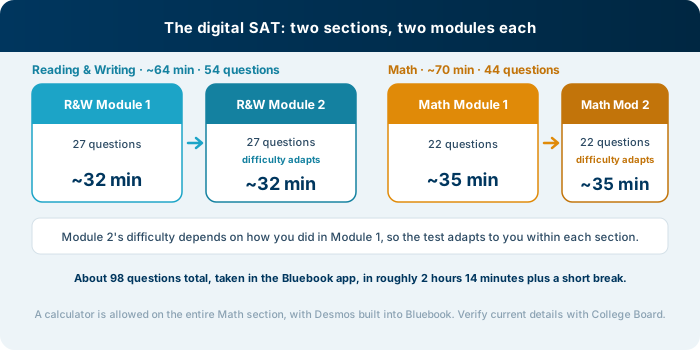
The digital SAT has two sections, and each section is split into two modules. Here is the full structure in one place.
| Section | Modules | Questions | Time | Adaptive? |
|---|---|---|---|---|
| Reading and Writing | 2 modules of 27 | 54 | About 64 min (about 32 min per module) | Module 2 difficulty adapts to Module 1 |
| Math | 2 modules of 22 | 44 | About 70 min (about 35 min per module) | Module 2 difficulty adapts to Module 1 |
| Total | 4 modules | About 98 | About 2 hr 14 min plus a short break | Section-adaptive |
That is roughly 98 questions in total, and the whole thing takes about 2 hours and 14 minutes of testing time, plus a short break between the two sections. You take it in College Board’s Bluebook app on a laptop or tablet, which you install ahead of time. The test is scored from 400 to 1600, the sum of two section scores of 200 to 800 each. (These details are current as of writing; you can verify them with College Board.)
The most important structural fact is the one that does not show up in a simple section list: the test is adaptive by section.
How section-adaptive testing works
The digital SAT uses what College Board calls multistage adaptive testing, and it works the same way in each section.
You start with the first module, which contains a mix of easy, medium, and hard questions. Based on how you do on that first module, the app routes you into a second module that is either more difficult or less difficult. In other words, Module 2’s difficulty depends on your Module 1 performance. A stronger first module sends you into a harder, higher-scoring second module; a weaker first module sends you into an easier one.
This has a few practical consequences:
- The first module matters a lot. Performing well on Module 1 routes you into the higher-difficulty Module 2, which is where the top score range is available. The harder second module simply has more points on the table, so you cannot afford to coast through the first module assuming you will make it up later.
- The test adapts within a section, not question by question. Unlike a fully adaptive test that changes after every answer, the SAT only branches once per section, between the two modules. Within a module, you can move freely, skip a question, flag it, and come back before time runs out.
- You cannot game the routing. There is no trick to it. The smart approach is simply to do your best on every question in Module 1, then keep going. Trying to manipulate which module you land in is a waste of energy that costs you points.
This is also why the digital SAT can feel hard exactly when you are doing well: a strong first module is rewarded with a tougher second one. That is the design working as intended, not a sign you are failing.
Reading and Writing, domain by domain
The Reading and Writing section looks very different from the old test. Instead of a few long passages with many questions attached, you get many short passages, each with a single question. Each passage is a short paragraph, and you answer one question about it before moving to the next. Because each passage is short and self-contained, the section rewards reading quickly and precisely rather than holding a long passage in your head.
The questions are organized into four content domains, which appear in a roughly fixed order within each module.
| Reading and Writing domain | What it covers |
|---|---|
| Craft and Structure | Vocabulary in context, the author’s purpose, the function of a sentence, and connections between two related texts |
| Information and Ideas | Main idea, specific details, supported inferences, and using textual or quantitative evidence (including small graphs and tables) |
| Standard English Conventions | Grammar and mechanics: punctuation, agreement, verb tense, and sentence boundaries |
| Expression of Ideas | Choosing effective transitions, combining sentences cleanly, and meeting a stated rhetorical goal |
The Standard English Conventions questions are the most learnable points on the entire test, because the grammar rules are finite. The reading-heavy domains reward a consistent habit: read the short passage for its point first, then confirm your answer against specific words in the text.
Math, domain by domain
The biggest piece of good news on the Math section is that a calculator is allowed on the entire section. The old split between a no-calculator part and a calculator part is gone. Bluebook even has a Desmos graphing calculator built in, so you have a powerful tool available on every question, and you can also bring an approved physical calculator if you prefer.
Math questions are mostly multiple choice, with some “student-produced response” questions where you type in your own numeric answer rather than picking from options. The content spans four domains.
| Math domain | What it covers |
|---|---|
| Algebra | Linear equations, systems, and inequalities in one or more variables |
| Advanced Math | Functions, quadratics, exponential relationships, and other nonlinear equations |
| Problem-Solving and Data Analysis | Ratios, rates, percentages, proportional reasoning, interpreting data, and basic statistics |
| Geometry and Trigonometry | Area and volume, lines and angles, right triangles, the Pythagorean theorem, basic trig, and circles |
Algebra is the highest-frequency domain, so fluency there pays off across many questions. For a deeper look at how to raise your score in each section, see our breakdown of digital SAT Math versus Reading and Writing.
The Bluebook app and on-screen tools
You take the digital SAT in College Board’s Bluebook app, installed on a laptop or tablet before test day. Bluebook is not just the delivery method; it is also where the official full-length practice tests live, which means you can prepare in the exact environment you will test in, down to the adaptive routing.
The app gives you a set of on-screen tools worth knowing before test day:
- A built-in Desmos graphing calculator, available on the entire Math section.
- A reference sheet of common formulas, available throughout Math.
- An annotation tool for highlighting text and leaving notes on a question.
- A “mark for review” flag so you can skip a tough question and return to it within the module.
- A countdown timer for the current module, which you can hide if it distracts you.
- Answer elimination, letting you cross out choices you have ruled out.
Because all of this is in the practice app too, there is no reason to meet any of it for the first time on test day. Practice in Bluebook until the tools are second nature.
How the digital SAT is scored
Your raw performance on all four modules converts into a total score from 400 to 1600, made up of two section scores from 200 to 800 each. The conversion is not a simple count of correct answers, because the adaptive design factors in the difficulty of the module you were routed into. Two students who answer the same number of questions correctly can earn different scores if one was working through the harder second module and the other was in the easier one.
The practical takeaway is the same one the adaptive format keeps pointing to: the harder second module carries the higher score range, so your goal on every question, starting with the very first, is simply to get it right. There is no scoring trick beyond accuracy. A small number of questions in each section are unscored pretest items that College Board is trying out for future tests, but you have no way to tell which ones they are, so the only sound approach is to treat every question as if it counts.
What test day actually looks like
Knowing the flow of test day removes a surprising amount of stress. Here is the shape of it:
- Before the day, you install Bluebook on your device, complete exam setup, and get an admission ticket. Charge your device fully and bring an approved physical calculator as a backup even though Desmos is built in.
- At the center, you check in, the proctor starts the exam, and you work through Reading and Writing first: Module 1, then the adaptive Module 2.
- A short break falls between the two sections. Use it.
- Then Math, again Module 1 followed by the adaptive Module 2, with the calculator and reference sheet available throughout.
- At the end, you submit, and your scores arrive online a couple of weeks later rather than on the spot. When you are ready to register, our guide to the 2026-2027 test dates and deadlines lays out every date and the score timing that follows it.
What going digital actually changed
A few practical implications follow from the shift to a shorter, digital, adaptive test:
- It is shorter and faster. At about 2 hours and 14 minutes, the digital SAT is noticeably shorter than the old paper exam, which changes how stamina factors into your prep. Endurance still matters, but less than it used to.
- You practice in the real environment. Because Bluebook provides full-length practice tests, your practice can mirror test day exactly, down to the on-screen tools and the adaptive routing. Use that. It is one of the biggest advantages of the digital format.
- Old “SAT strategy” content can mislead. Advice built around long reading passages, a no-calculator math section, or paper-test pacing is out of date. If a resource describes those, set it aside.
Why the format favors prepared test-takers
A shorter test with a defined set of skills and a practice app that mirrors test day is, if anything, more learnable than the old exam. There is a finite set of question types and a finite body of math, and steady practice maps directly onto a higher score. The adaptive format simply means your early performance carries weight, which rewards students who have done the work to be sharp from the first module.
The way to use all of this is to prepare in Bluebook, learn the two sections cold, and build a real plan around your starting point. Start with how to study for the SAT, set a target against what counts as a good SAT score, and when you are ready to sit it, check the 2026-2027 test dates and deadlines. If you are still choosing between exams, our SAT vs. ACT comparison walks through how the digital SAT stacks up against the ACT. Then drill the current format free during early access, and join the early-access list to get set up.
Frequently asked questions
What sections are on the digital SAT?
The digital SAT has two sections: Reading and Writing, and Math. Each section is split into two modules. Reading and Writing has two modules of 27 questions for 54 total in about 64 minutes, and Math has two modules of 22 questions for 44 total in about 70 minutes.
Is the SAT adaptive now?
Yes, the digital SAT is multistage adaptive by section. Each section has two modules, and the difficulty of the second module depends on how you performed on the first. The test adapts within a section, not question by question.
How long is the digital SAT?
The digital SAT takes about 2 hours and 14 minutes of testing time, plus a short break between the two sections. Plan for additional time on test day for check-in and instructions.
How many questions are on the digital SAT?
The digital SAT has about 98 questions total: 54 in Reading and Writing across two modules of 27, and 44 in Math across two modules of 22. A small number of questions are unscored pretest items mixed in, but you cannot tell which, so treat every question as scored.
Can I use a calculator on the digital SAT?
Yes. A calculator is allowed on the entire Math section, and the Bluebook app has a Desmos graphing calculator built in. You can also bring an approved physical calculator. Confirm the current approved-calculator policy with College Board.
What app do I use to take the digital SAT?
You take the digital SAT in College Board's Bluebook app, which you install on a laptop or tablet beforehand. The same app provides full-length practice tests, so you can prepare in the exact testing environment.
What is the digital SAT scored out of?
The digital SAT is scored from 400 to 1600. That total is the sum of two section scores, Reading and Writing and Math, each scored from 200 to 800.
Prepping for the SAT?
Start with the SAT prep options available today, or join the update list for new releases.